Auto-solve: what it will and won’t change
Having measured every recommendation, the obvious next step is a button that applies them. The interesting part is what it deliberately refuses to touch, and why that restraint is the feature rather than a limitation.
How it works
It applies validation fixes unconditionally — an over-contribution or an invalid age is simply an error. Then it works through the measured recommendations, applying each one only if it improves the active objective, and re-measuring after every change.
It also means the order is not arbitrary in a damaging way. Whatever sequence it applies, each step is verified against the plan as it stands at that moment.
What it will not do
It never writes CPP or OAS start ages. That is the single most deliberate restraint in the whole advice surface, and there are three reasons for it.
- The two benefits interact through the OAS recovery tax and GIS, so they are one joint decision rather than two independent optimisations.
- The scoring grid is often flat across several ages. Silently writing one age from a plateau implies a precision the comparison does not support.
- It is a decision with non-financial inputs — health, family longevity, when you actually want income — that a projection has no access to.
So the engine reports the direction and hands you to the dedicated optimizer, where the whole grid is visible. A number nobody chose is worse than a decision you made.
It also does not remove your investment fee. The fee is measured and reported — episode 32 showed the size of it — and no setting in a plan can make a real fee stop being charged.
Applied and withheld
Priya — 54, Ontario, single. $118,000 salary, $410,000 in her RRSP and $88,000 in her TFSA, planning to retire at 63.
Auto-solve would change Priya’s drawdown configuration, taking her from $399,597 to $547,069 — a measured improvement, applied because the comparison proved it.
It would leave her benefit ages alone, even though the grid ranges from $291,087 starting at 60 to $418,262 starting at 70 — a spread it can measure and will not act on.
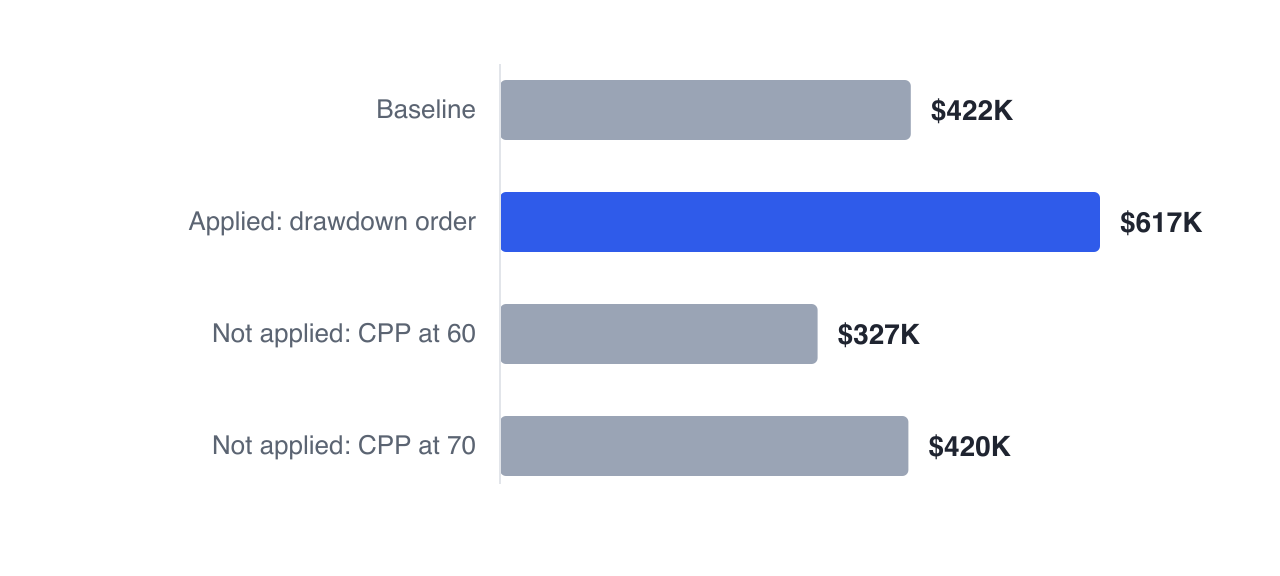
Notice that the two withheld bars sit on either side of the baseline, and not symmetrically: starting early costs her far more than deferring gains her. A blanket rule in either direction would get one of those two cases badly wrong, which is why a plateau-aware optimizer measures the spread and leaves the choice to her.
The right way to use it
As a starting point rather than an answer. Run it, look at what changed, and ask whether each change is something you would actually do — a drawdown order you are comfortable with, a contribution level you can sustain. Every change is undoable, which is the point of being able to see them.
The most useful output is often not the new plan but the list: the ranked ordering of what your plan is sensitive to, which is the same information the sensitivity exercise in episode 71 produces, arrived at automatically.
The advice panel applies the measured recommendations that improve your objective and lists exactly what changed — with benefit timing left for the optimizer, and for you.
Next: the three stress tests worth running on any plan.
GlidePathEngine is an educational planning tool — not financial, investment, tax, or legal advice.